Professional modding toolkit built for creators. Unlock the full potential of your favorite Frostbite engine games with advanced tools, seamless mod management, and an intuitive workflow.
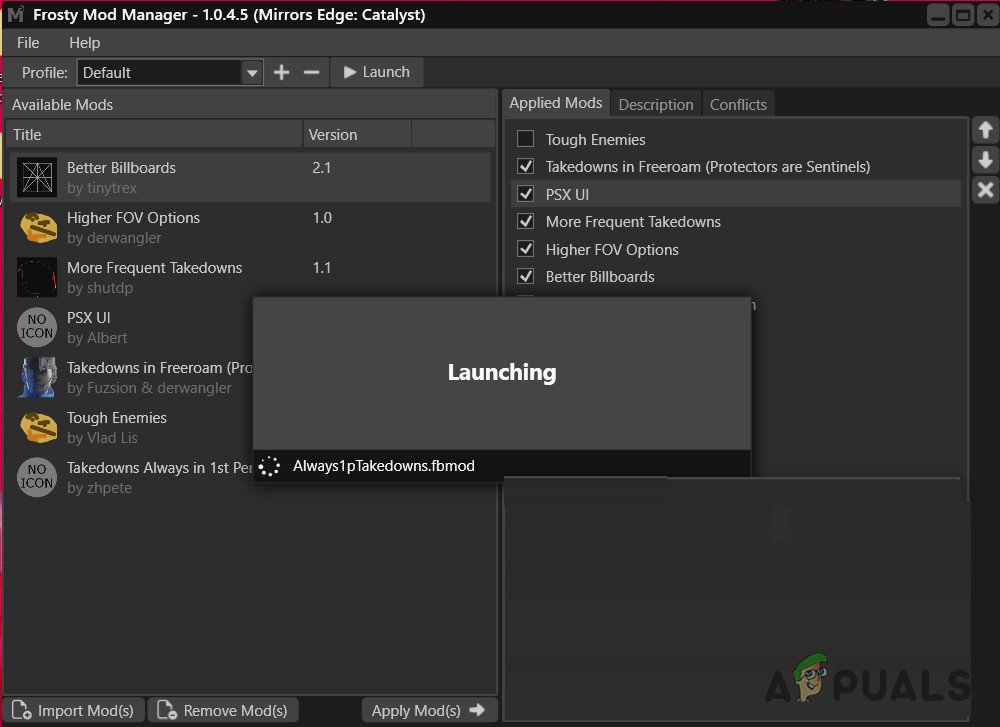
Experience the power of a modding platform designed from the ground up to understand Frostbite's unique architecture.
Frosty Mod Manager is your complete solution for modding Frostbite engine games. Whether you want to customize textures, tweak gameplay mechanics, or create entirely new content, Frosty provides professional-grade tools that make complex modding accessible to everyone.
Unlike generic mod managers, Frosty was specifically engineered to work with the Frostbite engine's complex file structures. This means better compatibility, faster loading times, and more reliable mod application across all supported titles.
Every feature designed to enhance your modding workflow and creativity.
Organize your mods with collections, manage load orders effortlessly, and enable or disable mods with a single click. The intuitive interface makes managing hundreds of mods simple.
Edit textures, meshes, sounds, and game data with powerful built-in editors. Import and export assets in industry-standard formats like PNG, FBX, OBJ, and more.
Extend functionality with custom plugins. Access a growing library of community-created plugins for specialized editing tasks and game-specific features.
Browse and search through game files with powerful filtering tools. Find exactly what you need with advanced search capabilities and visual asset previews.
Lightning-fast mod loading with intelligent caching. Enjoy smooth performance even with extensive mod libraries thanks to optimized code and efficient memory management.
Your original game files remain untouched. All modifications are applied virtually, meaning you can easily revert to vanilla gameplay anytime without reinstalling.
Replace and customize in-game audio with full support for multiple formats. Preview sounds before importing and batch process audio files for efficiency.
Automatic detection of mod conflicts with detailed reports. Resolve conflicts intelligently or choose which mod takes priority with the built-in conflict manager.
Create custom mod packs for different playstyles or scenarios. Share your favorite mod combinations with the community or switch between setups instantly.
Getting started with Frosty is incredibly straightforward.
Download and Install: Get the latest version of Frosty Mod Manager and run the installer. The setup process is streamlined and takes just a few minutes. Frosty will automatically detect all compatible Frostbite games installed on your system.
Import Your Mods: Download mods from your favorite modding communities and import them into Frosty. The mod manager supports various formats and automatically organizes everything for you. You can drag and drop mod files or use the built-in browser.
Configure and Launch: Select which mods you want active, arrange them in the proper load order, and hit the launch button. Frosty handles all the technical details, applying your mods seamlessly and starting your game with all modifications active.
Advanced users can dive deeper with the Frosty Editor to create custom content, modify existing assets, and even develop entirely new game features. The editor provides professional-level tools while remaining accessible to newcomers through comprehensive documentation and community tutorials.
Comprehensive support for major Frostbite engine titles.
BF1, BF4, BFV, BF Hardline
Battlefront, Battlefront II, Squadrons
FIFA 17, 18, 19, 20
Madden 19, Madden 20
NFS, Payback, Heat, Rivals
Dragon Age: Inquisition
Mass Effect: Andromeda
Anthem, Mirror's Edge, PvZ
Connect with fellow modders, share creations, and get support.
Frosty Mod Manager is backed by a vibrant community of creators, developers, and gaming enthusiasts. Whether you need help troubleshooting an issue, want to showcase your latest creation, or simply want to discuss modding techniques, you will find a welcoming community ready to assist.
The platform receives continuous updates driven by community feedback. Regular releases introduce new features, expand game support, improve performance, and fix reported issues. Your suggestions and bug reports directly shape the future of Frosty.
Access extensive documentation, video tutorials, and guides created by both the core development team and community contributors. From basic mod installation to advanced asset creation, resources are available for every skill level.
As an open-source project, Frosty benefits from transparency and collaborative development. Experienced developers can contribute code, create plugins, or help improve the platform. Everyone benefits from the collective knowledge and expertise of the community.